Microsoft Copilot: A Comprehensive Overview of AI Integration and Capabilities

Onyekachi Udochukwu
August 22, 2026
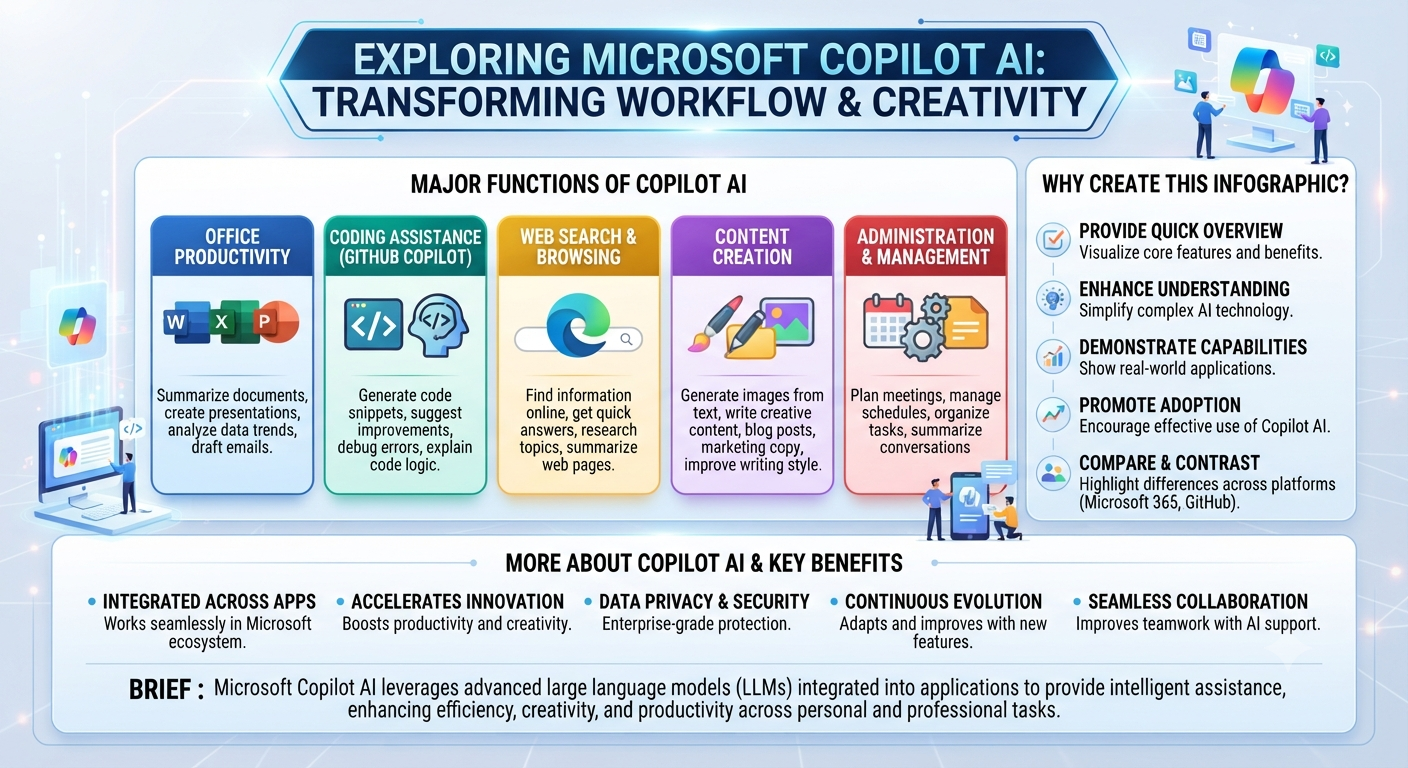
Microsoft Copilot stands as one of the most prominent enterprise and consumer artificial intelligence platforms in the modern technology landscape. Integrated deeply across Windows, Microsoft 365, developer tools, and the web, Copilot has evolved from an experimental coding assistant into a ubiquitous digital companion. Understanding its architecture, ecosystem, and core features provides insight into how AI continues to reshape productivity, software development, and everyday workflows.
1. Evolution and Architectural Foundation
The journey of Microsoft Copilot began with GitHub Copilot in 2021, an AI-powered code completion tool developed in collaboration with OpenAI. Building on the success of that developer-focused utility, Microsoft gradually expanded the "Copilot" brand across its entire portfolio, unifying tools like Bing Chat, Azure OpenAI Service integrations, and Microsoft 365 Copilot under a single banner.
At its technical core, Copilot is powered by advanced large language models (LLMs)—primarily from OpenAI’s GPT family—integrated with the Microsoft Graph. This integration is what differentiates Copilot from standalone chatbots. While a standard LLM relies solely on its pre-trained weights and public data, Copilot grounds its responses in a user's organizational context. By securely accessing a user's emails, calendar events, chat messages, documents, and meetings via the Microsoft Graph, Copilot can answer hyper-specific, contextual queries like, "Summarize the action items from my meeting with the marketing team yesterday."
2. Core Ecosystem and Implementations
Copilot is not a single standalone application; rather, it is a modular ecosystem embedded into the software products millions of people use daily:
Microsoft 365 Copilot: Embedded directly into Word, Excel, PowerPoint, Outlook, and Teams, this suite transforms how knowledge workers interact with documents and data. In Word, it can draft proposals or rewrite sections based on natural language prompts. In Excel, it analyzes trends, generates formulas, and creates data visualizations on command. In PowerPoint, it builds entire slide decks from a single Word document or prompt.
Copilot in Windows: Serving as an operating system-level assistant, Windows Copilot allows users to adjust system settings, launch applications, summarize open windows, and answer queries directly from the taskbar.
GitHub Copilot: The gold standard for AI pair programming, GitHub Copilot assists software engineers by auto-completing code blocks, generating unit tests, explaining complex algorithms, and translating code between different programming languages directly within integrated development environments (IDEs) like Visual Studio Code.
Copilot Studio: A low-code tool that empowers organizations to build, customize, and publish their own specialized copilots tailored to specific business logic, internal knowledge bases, or customer service workflows.
3. Enterprise Security, Privacy, and Governance
As AI adoption accelerates in corporate environments, data security and privacy remain paramount concerns. Microsoft has structured Copilot with enterprise-grade protections designed to meet rigorous compliance standards:
Data Isolation and Privacy: Enterprise data processed by Microsoft 365 Copilot is never used to train the underlying foundation models. Prompts, responses, and referenced organizational data remain strictly within the tenant's security boundary.
Inherited Permissions: Copilot respects existing user permissions and access controls. If a user does not have permission to view a specific SharePoint document or folder, Copilot cannot retrieve or summarize that document in its responses.
Responsible AI Framework: Microsoft adheres to a strict set of ethical principles—fairness, reliability, privacy, security, inclusiveness, and transparency—to mitigate issues such as algorithmic bias, hallucinations, and harmful content generation.
4. Economic and Productivity Impacts
Independent studies and internal Microsoft metrics indicate that AI assistants like Copilot deliver measurable productivity gains across diverse job roles. Knowledge workers report completing routine tasks—such as email triaging, meeting summarization, and initial content drafting—in a fraction of the traditional time.
For developers, GitHub Copilot has been shown to increase coding velocity significantly, allowing engineers to focus on architectural problem-solving and system design rather than boilerplate syntax. However, these productivity gains also necessitate a shift in workforce skill sets. Employees must develop strong prompt engineering capabilities, critical evaluation skills to catch potential hallucinations, and effective oversight workflows to ensure AI-generated outputs meet professional standards.
5. Future Outlook and Challenges
Looking ahead, the trajectory of Copilot points toward increasingly autonomous agentic workflows. Rather than simply answering questions or drafting text when prompted, future iterations of Copilot are designed to act as proactive agents that can execute multi-step business processes independently—such as auditing an inventory supply chain, drafting invoices, and notifying relevant stakeholders without requiring constant human intervention.
Despite these advancements, challenges remain. Managing API costs, reducing latency, preventing sophisticated prompt injection attacks, and ensuring consistent accuracy across niche domains are ongoing engineering hurdles. Furthermore, organizations must navigate the cultural shifts required to integrate autonomous digital teammates successfully.
Ultimately, Microsoft Copilot represents a paradigm shift from traditional software interfaces—where humans must navigate complex menus and syntax—to conversational, intent-driven interactions. By blending powerful generative AI models with deep enterprise context, Copilot redefines the boundaries of human-computer collaboration in the modern digital age.
1. Evolution and Architectural Foundation
The journey of Microsoft Copilot began with GitHub Copilot in 2021, an AI-powered code completion tool developed in collaboration with OpenAI. Building on the success of that developer-focused utility, Microsoft gradually expanded the "Copilot" brand across its entire portfolio, unifying tools like Bing Chat, Azure OpenAI Service integrations, and Microsoft 365 Copilot under a single banner.
At its technical core, Copilot is powered by advanced large language models (LLMs)—primarily from OpenAI’s GPT family—integrated with the Microsoft Graph. This integration is what differentiates Copilot from standalone chatbots. While a standard LLM relies solely on its pre-trained weights and public data, Copilot grounds its responses in a user's organizational context. By securely accessing a user's emails, calendar events, chat messages, documents, and meetings via the Microsoft Graph, Copilot can answer hyper-specific, contextual queries like, "Summarize the action items from my meeting with the marketing team yesterday."
2. Core Ecosystem and Implementations
Copilot is not a single standalone application; rather, it is a modular ecosystem embedded into the software products millions of people use daily:
Microsoft 365 Copilot: Embedded directly into Word, Excel, PowerPoint, Outlook, and Teams, this suite transforms how knowledge workers interact with documents and data. In Word, it can draft proposals or rewrite sections based on natural language prompts. In Excel, it analyzes trends, generates formulas, and creates data visualizations on command. In PowerPoint, it builds entire slide decks from a single Word document or prompt.
Copilot in Windows: Serving as an operating system-level assistant, Windows Copilot allows users to adjust system settings, launch applications, summarize open windows, and answer queries directly from the taskbar.
GitHub Copilot: The gold standard for AI pair programming, GitHub Copilot assists software engineers by auto-completing code blocks, generating unit tests, explaining complex algorithms, and translating code between different programming languages directly within integrated development environments (IDEs) like Visual Studio Code.
Copilot Studio: A low-code tool that empowers organizations to build, customize, and publish their own specialized copilots tailored to specific business logic, internal knowledge bases, or customer service workflows.
3. Enterprise Security, Privacy, and Governance
As AI adoption accelerates in corporate environments, data security and privacy remain paramount concerns. Microsoft has structured Copilot with enterprise-grade protections designed to meet rigorous compliance standards:
Data Isolation and Privacy: Enterprise data processed by Microsoft 365 Copilot is never used to train the underlying foundation models. Prompts, responses, and referenced organizational data remain strictly within the tenant's security boundary.
Inherited Permissions: Copilot respects existing user permissions and access controls. If a user does not have permission to view a specific SharePoint document or folder, Copilot cannot retrieve or summarize that document in its responses.
Responsible AI Framework: Microsoft adheres to a strict set of ethical principles—fairness, reliability, privacy, security, inclusiveness, and transparency—to mitigate issues such as algorithmic bias, hallucinations, and harmful content generation.
4. Economic and Productivity Impacts
Independent studies and internal Microsoft metrics indicate that AI assistants like Copilot deliver measurable productivity gains across diverse job roles. Knowledge workers report completing routine tasks—such as email triaging, meeting summarization, and initial content drafting—in a fraction of the traditional time.
For developers, GitHub Copilot has been shown to increase coding velocity significantly, allowing engineers to focus on architectural problem-solving and system design rather than boilerplate syntax. However, these productivity gains also necessitate a shift in workforce skill sets. Employees must develop strong prompt engineering capabilities, critical evaluation skills to catch potential hallucinations, and effective oversight workflows to ensure AI-generated outputs meet professional standards.
5. Future Outlook and Challenges
Looking ahead, the trajectory of Copilot points toward increasingly autonomous agentic workflows. Rather than simply answering questions or drafting text when prompted, future iterations of Copilot are designed to act as proactive agents that can execute multi-step business processes independently—such as auditing an inventory supply chain, drafting invoices, and notifying relevant stakeholders without requiring constant human intervention.
Despite these advancements, challenges remain. Managing API costs, reducing latency, preventing sophisticated prompt injection attacks, and ensuring consistent accuracy across niche domains are ongoing engineering hurdles. Furthermore, organizations must navigate the cultural shifts required to integrate autonomous digital teammates successfully.
Ultimately, Microsoft Copilot represents a paradigm shift from traditional software interfaces—where humans must navigate complex menus and syntax—to conversational, intent-driven interactions. By blending powerful generative AI models with deep enterprise context, Copilot redefines the boundaries of human-computer collaboration in the modern digital age.